- A:
- NOTES:
* Applies to devices using firmware version 2.0 and above. If you are not using the latest firmware version please upgrade the firmware.
* Please make sure you are using the latest version of Java. If you are unsure on what version you are current running, please visit www.java.com/verify *
Plese select your browser:
- Using IE
- Using Firefox
- Using Chrome
- Using Safari
Using IE
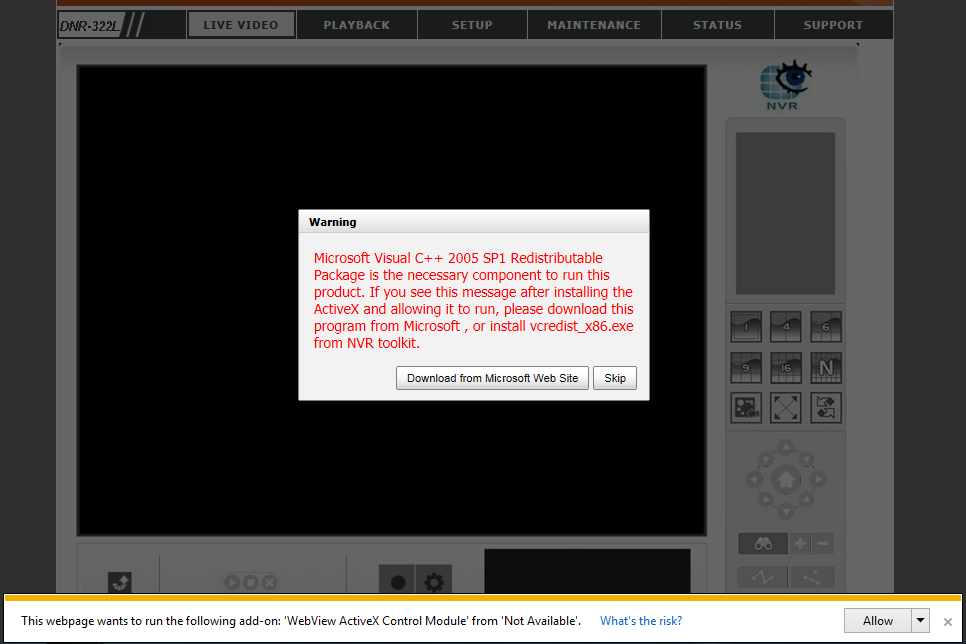
Step 1: To view the LIVE VIDEO and PLAYBACK, please make sure to install the Microsoft Visual C++ 2005 SP1 Redistributable Package. The file can be located on the included CD, at http://www.microsoft.com/en-us/download/details.aspx?id=5638, or by clicking on the “Download from Microsoft Web Site” on the Warning pop up message
Step 2: Make sure to allow all add-ons to properly view the LIVE VIDEO and PLAYBACK. Step 1: To view the LIVE VIEW and PLAYBACK, please make sure to download/install the latest version of Java.Step 2: Click the “Activate Java Platform SE 7 U.” link or click the block icon to the left of the address barStep 3: Click to Allow Now or Allow and RememberStep 4: Run the Java application.Step 5: Allow the security warning popup.Step 6: You should now be able to see the LIVE VIEW or PLAYBACKStep 1: To view the LIVE VIDEO and PLAYBACK, please make sure to download/install the latest version of Java.Step 2: Right click the viewing area, and Run this plug-inStep 3: Or click the icon on the far right hand corner of the address bar to Always allow plug-ins to on X.X.X.XStep 4: Run the Java applicationStep 5: Allow the security warning popup.Step 6: You should now be able to see the LIVE VIDEO or PLAYBACKStep 1: To view the LIVE VIDEO and PLAYBACK, please make sure to download/install the latest version of Java.Click on the Java blocked for this websiteStep 2: Trust to run this plug-in.Step 3: Run the Java applicationStep 4: If you get an error message on the bottom of the LIVE VIDEO, such as the picture below in the red box, continue on to Step 5 to 10.Step 5: Go into Safari’s Preferences…Step 6: Click on the Security button. Make sure Internet plug-ins: is check marked, and click on Manage Website Settings…Step 7: In the Java plug-in section. Under Currently Open Websites, you should see the IP address of the DNR. On the drop menu, set to Run in Unsafe Mode. Step 8: Trust to run the website in unsafe modeStep 9: Allow the Java applicationStep 10: We should now be able to view the LIVE VIDEO or PLAYBACK
How to view the Live Video and Playback for my Network Video Recorder?
Quick Summary / Highlights
A: NOTES: * Applies to devices using firmware version 2.0 and above. If you are not using the latest firmware version please upgrade...
problem not solved thanks
I sent an e-mail from the communication channel. Can you help?
I am having trouble with the installation
hello nice sharing thanks
It was a great sharing