
Dahua NVR iSCSI NAS Setup, iSCSI presents volumes as a block storage device which makes them ideal for use by enterprise applications such as Microsoft Exchange and Microsoft SQL Server. In particular, the Microsoft iSCSI Software Initiator is the component of the overall iSCSI environment that makes it possible to make the iSCSI SAN attached disks appear to be local attached disks.
Difference between FC SAN, ISCSI SAN, DAS and NAS
SAN (Storage Area Network) Advantages
1) Share storage among different application servers.
2) Data is stored at a block level.
3) Physical elements of the SAN (servers, switches, storage arrays, etc.) are connected with Fibre Channel.
4) SAN is scalability and flexibility.
5) Storage can be added without disrupting the applications and different types of storage can be added to the pool.
5) Backups is centralized so reducing workload and providing greater assurance that the backups are complete.
6) Backup traffic never impacts users on the LAN.
ISCSI (IP Small Computer System Interface) SAN Advantages
1) iSCSI is a lower cost alternative to Fibre Channel SAN infrastructure.
2) Interconnect is Ethernet cable and the switches are Gigabit Ethernet.
3) Protocol used is TCP/IP.
Dahua NVR iSCSI NAS Setup
iSCSI presents volumes as a block storage device which makes them ideal for use by enterprise applications such as Microsoft Exchange and Microsoft SQL Server. In particular, the Microsoft iSCSI Software Initiator is the component of the overall iSCSI environment that makes it possible to make the iSCSI SAN attached disks appear to be local attached disks.
DAS (Direct Attached Storage) Advantages
1) The disks may be internal to the server or in an array that is connected directly to the server.
2) Backups must either be performed on each individual server.
3) Storage can only be added by taking down the application server then adding physical disks and then rebuilding the storage. array.
NAS (Network Attached Storage) Advantages
1) NAS accesses data by file.
2) NAS manages its own file system.
3) NAS can be accesses across multiple operating systems.
4) NAS backups are more efficient. (With NAS feature called Snapshot provides an almost instantaneous way for the systems administrator to recover lost, deleted, or corrupted files.)
5) Administrators can assign shares, security settings as they would for a regular file server.
How to Setup iSCSI with Windows Server 2012
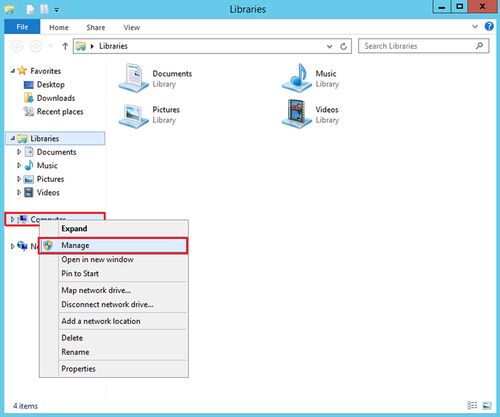
1. Log onto your Windows Server 2012 machine and launch the file explorer. Right click on Computer and select Manage.
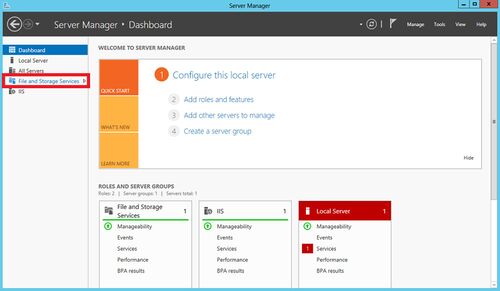
2. Under the Server Manager screen select File and storage Services.
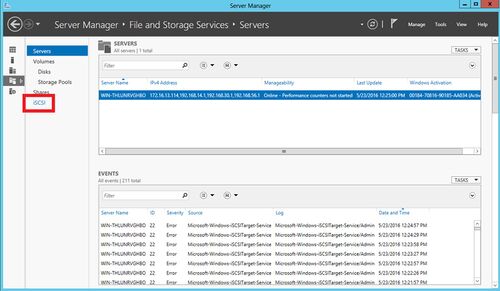
3. Now select iSCSI
4. Select “To create an iSCSI virtual disk, start the New iSCSI Virtual Disk Wizard” link.
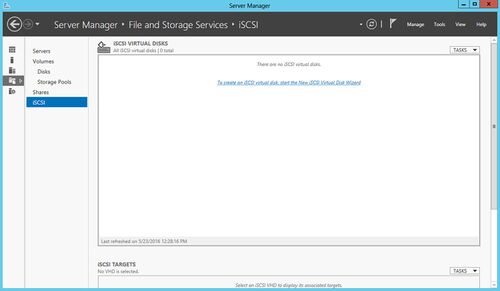
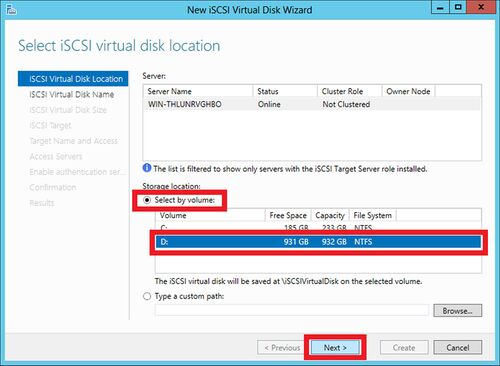
5. Select the volume (or disk) that the virtual drive will live on and click next.
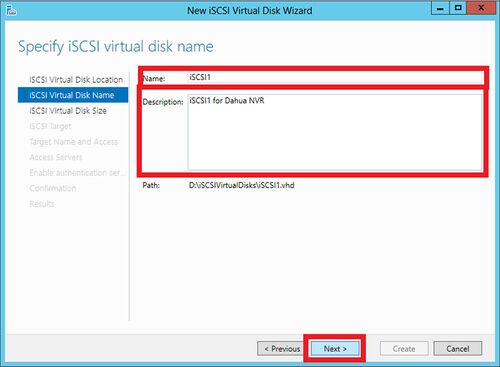
6. Name your Virtual Disk, and enter a description for filing purposes, then click next.
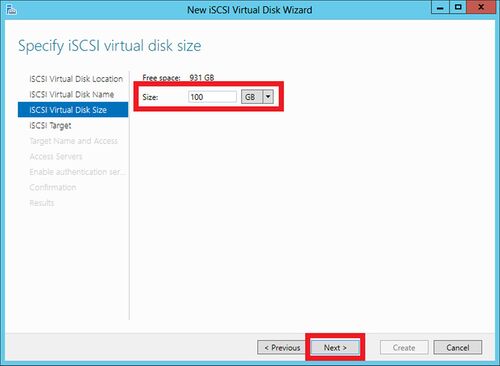
7. Define the size for your iSCSI Virtual Disk (must be above 32gb to work with Dahua NVR’s that support iSCSI), then click next.
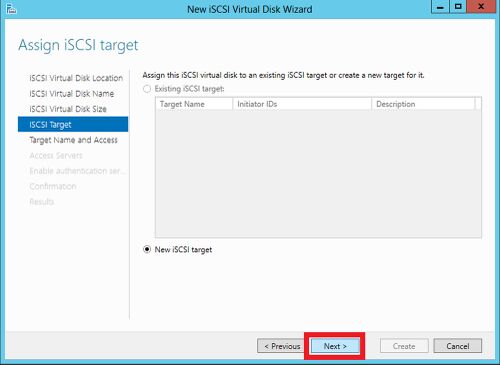
8. Click New iSCSI target (target = NVR’s IP), then click next.
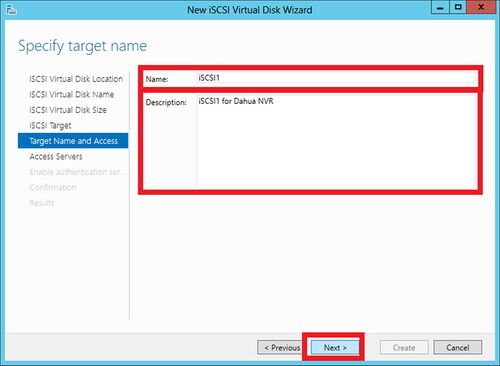
9. Name and describe the Target as you see fit, then click next.
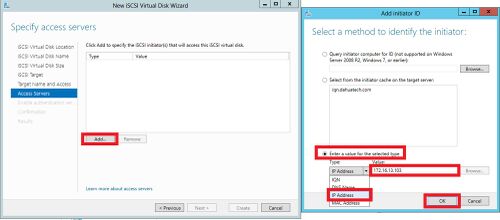
10. Select Add and select “Enter a value for the selected type, then use IP Address as the type and enter your NVR’s IP Address, then click OK, then click next.
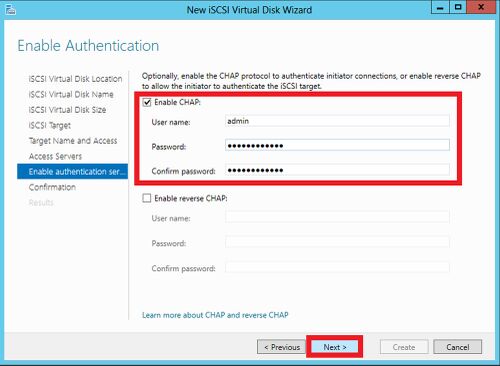
11. Now enable CHAP and enter a username and a password of 12 characters, then click next.
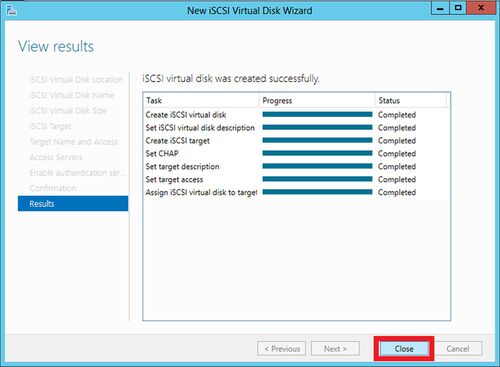
12. Click Create
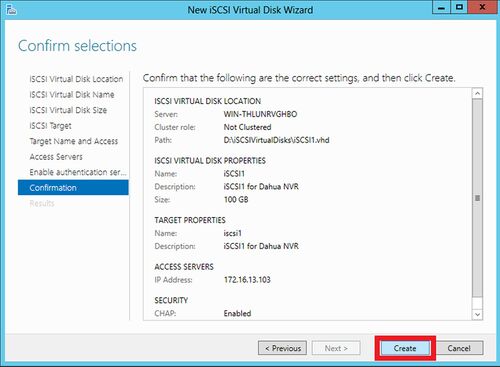
13. Once all tasks are completed close out the setup wizard.
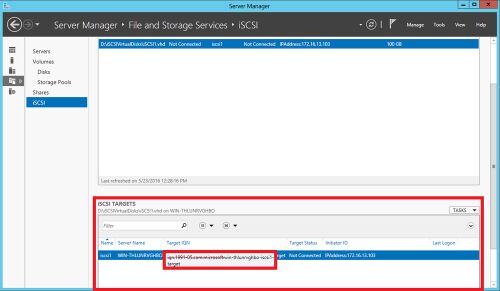
14. In the Server Manager window scroll down and you will now see your target IQN and iSCSI setup information.
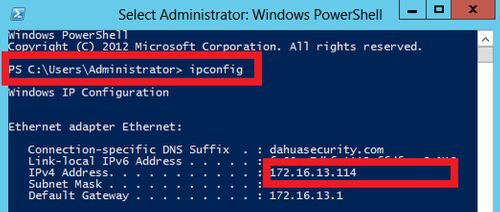
15. Run PowerShell and enter in “ipconfig” in order to get the IP of your device, this IP will be inputted into your NVR’s settings.
16. Now log into your NVR
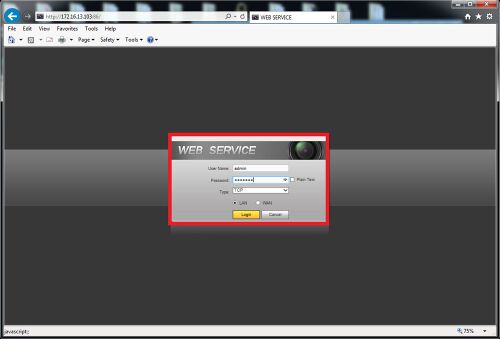
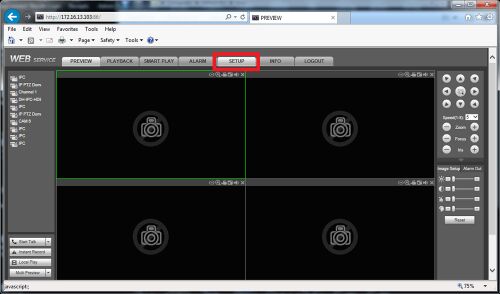
17. Select Setup
18. Select Storage then select iSCSI in the drop down menu and enter in the Server IP Address (the one returned on PowerShell) and configured port (the default is 3260), User name, and password, then click add on path and the NVR should automatically find the path. Select the path and click OK.

19. Now click add
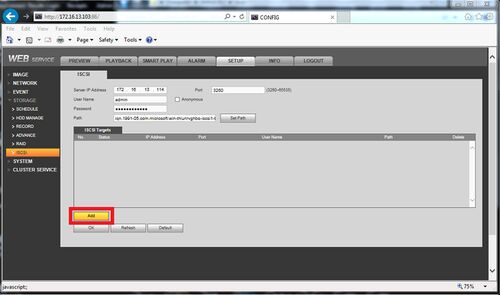
20. Click refresh if your iSCSI doesn’t connect at first. In time it will initiate and connect, then click OK.

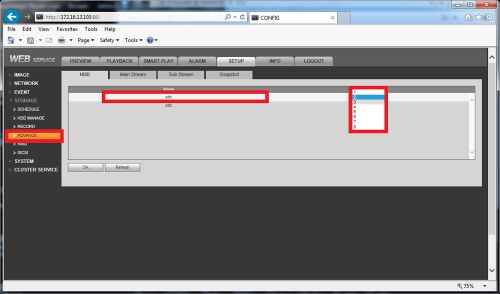
21. Click the advanced tab to configure your newly added iSCSI disk to a HDD group
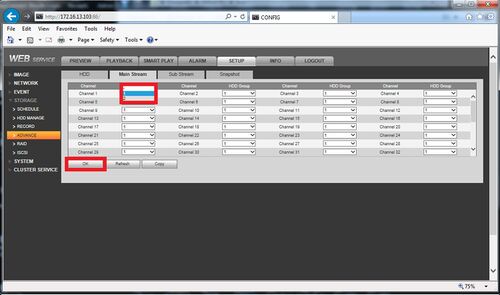
22. Click the other tabs (main stream, sub stream, or snapshot) to configure where each channel will be saved to.
How to setup NAS Storage
NAS Storage Setup
NFS and CIFS , both of them are network protocol. NFS runs in Linux/Unix operating system normally. CIFS runs in Windows system normally.
Dahua Camera supports NAS which is only based on NFS, so there must be on NFS server to running NFS service , otherwise cameras are impossible to send recording/images by NAS mode.
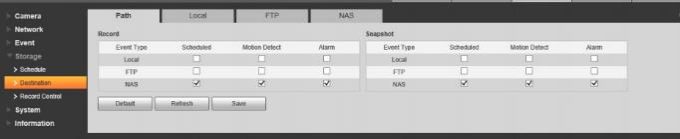
Users can install one NAS devices , for example our ESS, EVS5000 both have NAS function. Of course users can create their own Linux server based on any Linux system. For example Ubuntu/CentOS/Fedaro/Redhat.
Testing Demo Example
Condition:
1)One PC which is installed Ubuntu 14.04 and running NFS server already.
2)One Bullet Dahua IP camera , set NAS storage mode already and add PC server’s address / storage path into.
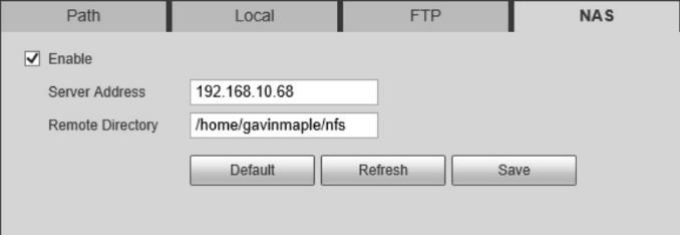
PC ‘s address:192.168.10.68 IP camera address: 192.168.10.246 NFS Path: \home\gaivmaple\nfs
3) please don’t worry about NAS server password, IPC still can record in it.
How to Setup NAS Recording
https://dahuawiki.com/images/f/f0/NASRecordingSetup.pdf
- QNAP iSCSI for Dahua NVR, Synology iSCSI for Dahua NVR, NetApp iSCSI for Dahua NVR, Dell EMC iSCSI for Dahua NVR
- Dahua NVR iSCSI, iSCSI NAS storage for Dahua NVR, Dahua NVR storage setup, network attached storage for surveillance, NAS for CCTV, iSCSI target setup, SAN storage for video surveillance
- how to connect Dahua NVR to iSCSI NAS, Dahua NVR iSCSI configuration, iSCSI target setup for Dahua NVR, iSCSI LUN creation for Dahua NVR, iSCSI initiator setup on Dahua NVR, iSCSI NAS for video surveillance, best iSCSI NAS for Dahua NVR, iSCSI NAS performance for video surveillance
- Dahua NVR iSCSI SAN storage, Dahua NVR iSCSI LUN, Dahua NVR iSCSI target discovery, Dahua NVR iSCSI login, Dahua NVR iSCSI connection, Dahua NVR iSCSI performance tuning, Dahua NVR iSCSI troubleshooting, Dahua NVR iSCSI best practices
- how to configure iSCSI target on QNAP NAS for Dahua NVR, how to configure iSCSI target on Synology NAS for Dahua NVR, how to configure iSCSI initiator on Dahua NVR, iSCSI NAS for large scale video surveillance, iSCSI NAS performance comparison for Dahua NVR, iSCSI NAS redundancy for Dahua NVR, iSCSI NAS backup for Dahua NVR, iSCSI NAS failover for Dahua NVR
- iSCSI protocol, iSCSI initiator, iSCSI target, LUN, CHAP authentication, iSCSI bonding, iSCSI multipathing, iSCSI performance benchmarks, iSCSI storage area network